
A cloud phone system with CRM integration combines business calling, texting, routing, and customer-record context in one workflow. The right system depends on your CRM, which interaction data syncs, how your team routes calls, and what the plan includes. Compare the full workflow—from first ring to CRM follow-up—before choosing.
Key takeaways
- A useful CRM phone integration connects click-to-call and caller identification with call and text activity on the correct customer record.
- A CRM listing does not guarantee that recordings, SMS threads, AI summaries, or contact updates sync; test each item.
- Phone menus, queues, and business hours are phone-system capabilities that may be separate from CRM synchronization.
- A pilot should test inbound and outbound calls, a known contact, an unknown caller, a text, and a missed call before rollout.
- The FTC says covered sellers and telemarketers generally must access and update the National Do Not Call Registry at least every 31 days; applicability depends on the campaign.
Which cloud phone systems combine calling, texting, routing, and CRM integration?
Voicalyst, CloudTalk, Aircall, Dialpad, RingCentral, and JustCall offer combinations of business calling and CRM-related capabilities, but details vary by provider, CRM, and plan. Compare systems against your workflow: calls and texts, contact matching, activity logging, routing, browser use, and the cost of required tiers or add-ons.
A cloud phone system with CRM integration is internet-based business calling software that connects phone activity and customer context with a customer relationship management (CRM) platform. For a US sales or support team, the goal is to handle a call or text and leave a usable record without manually reconstructing the interaction later.
| Provider | What to verify for your CRM | Calling and routing questions | Plan and setup checks |
|---|---|---|---|
| Voicalyst | HubSpot sync, contact matching, call and text activity, recordings, and summaries | Browser calling, business numbers, menus, queues, voicemail, and power dialing | Confirm which capabilities are available on the plan you would use |
| CloudTalk | Supported CRM objects and which activities appear on records | Inbound routing, outbound tools, and SMS coverage for your workflow | Check integration setup and plan requirements |
| Aircall | Call logging, contact matching, and any supported text activity | Team routing, queues, and calling workflow | Verify feature and integration availability by plan |
| Dialpad | What call details and AI-related data pass into your CRM | Browser or app calling, routing, and AI capabilities | Check CRM, user, and plan prerequisites |
| RingCentral | Which CRM records receive call activity and what syncs | Phone system scope, routing, and device support | Confirm the required edition and add-ons |
| JustCall | Call and text logging, contact matching, and supported CRM actions | Dialing tools, inbound routing, and SMS workflow | Verify tier requirements and CRM-side prerequisites |
Treat this as a shortlist, not a ranking: providers can change features and plan packaging. Confirm claims in current provider documentation and your CRM’s integration directory, then test them with your records and user permissions. Salesforce reported that sales representatives spend 28% of their week actually selling, with the remainder going to tasks including data entry and deal management; that is Salesforce research, not an independent government statistic (Salesforce State of Sales).
For a closer look at sales workflows, see this cloud phone system buying guide for sales teams. Teams that rely on contact history and recordings can also review this guide to call recordings and CRM notes.
What should a phone system and CRM integration actually do?
A useful phone system and CRM integration connects customer identity, communication, and follow-up: staff can call from a record, see who is calling, and find the interaction afterward. Sync details vary, so confirm each desired activity and whether information moves one way or both ways.
How does click-to-call and caller context help?
Click-to-call lets a user start a call by selecting a phone number in the CRM. Caller context, often shown as a screen pop, can identify a matching contact or account when an inbound call arrives. Test whether the system searches by number, displays relevant CRM details, and handles multiple records with the same number.
Which call, text, and recording details should sync?
Call logging can capture details such as time, duration, direction, and assigned contact. A logged call does not necessarily mean its recording, notes, outcome or disposition, and AI-generated summary will appear on the same record. Ask which data syncs automatically, what requires an agent action, and where permissions control access.
The same distinction applies to SMS. A provider may offer business texting without placing the message thread on the CRM contact’s timeline. Voicalyst describes its HubSpot calling integration, AI call summaries, and business texting as product capabilities; confirm availability and behavior for your account before relying on them.
What is contact matching and two-way sync?
Contact matching connects a phone number to a CRM record. Two-way sync means changes can travel between systems, but an integration may not support it for every field or record type. Check what happens with duplicate numbers, a shared household or office line, an unknown caller, or a contact with a changed number.
How should you compare systems by your team's workflow?
Compare phone systems by tracing a real customer interaction from the first ring to the CRM record and next action. Sales teams may need click-to-call and activity logging; support teams may need a queue, caller context, and a complete interaction history. CRM compatibility alone cannot answer either question.
What should HubSpot-centered teams test?
If HubSpot is central to your workflow, check which HubSpot records the integration can search and update. Then test click-to-call, inbound caller matching, calls and texts on the timeline, and whether staff can access details without switching tools. Voicalyst describes a browser-based workflow with business numbers, routing, voicemail, texting, AI summaries, and power dialing; verify which features fit your setup and plan.
When does a power dialer help sales teams?
A power dialer places calls from a prepared list to reduce manual number entry. It may suit a sales team working through a prospect queue, but buyers should check how it handles call outcomes, retry rules, contact ownership, and follow-up tasks. A dialer that makes calls quickly but fails to log them correctly can leave the CRM less useful.
Which routing features matter for support teams?
For support, test whether phone menus, queues, business hours, voicemail, and missed-call follow-up match how customers reach the team. Ask whether routing can use CRM ownership or whether agents must identify and transfer callers themselves. The Bureau of Labor Statistics reports about 2.7 million customer service representative jobs in 2025 and notes that many representatives work in call centers while some work from home (BLS: Customer Service Representatives).
Voicalyst describes IVR phone menus and call routing for directing callers, and voicemail transcription for turning voicemail into readable text. Check how those details connect to CRM records and whether the relevant plan includes them.
How do calls, texts, and routing work together?
A well-integrated phone workflow identifies the caller, routes the call to the right person or team, and records the outcome against the correct CRM record. For texts, the workflow should preserve enough context for another authorized teammate to understand the exchange and continue it without asking the customer to repeat information.
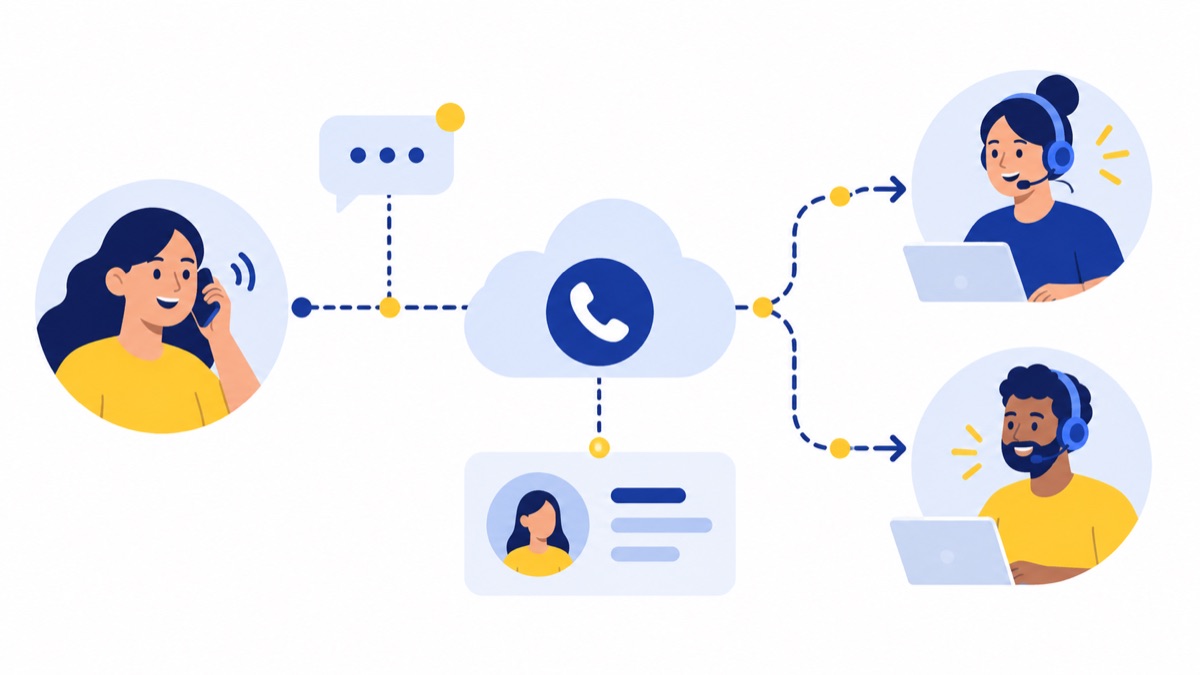
Consider an inbound inquiry: a customer calls the published business number, hears a menu, and chooses sales or support. The system routes the call according to the team’s setup; the agent sees a matching record if one exists, then logs the call and next step. Test what happens if the caller hangs up in a queue or leaves voicemail.
For an outbound follow-up, a rep opens a CRM contact, starts a call, and records the result. If the rep sends a text, check whether it appears in the same customer history and whether replies reach the appropriate inbox. A simple shared calling workflow may be enough for a small team; larger groups may need queue management, role controls, and more detailed reporting.
This matters in a mobile-first market: Pew’s 2025 survey found that 91% of US adults owned a smartphone, while 98% owned a cellphone of some kind (Pew Research Center: Mobile Fact Sheet). The statistic does not determine which channel a customer prefers, so use your own contact patterns to guide the choice.
How do you choose a cloud phone system with CRM integration?
Choose a cloud phone system by matching the CRM, communication mix, team size, and implementation needs to verified capabilities and full cost. Start with your highest-volume workflow, then confirm the phone-system tier, CRM subscription, device support, number-porting process, user administration, and support arrangements needed to run it.
Which CRM and plan requirements should you check?
List the CRM records and fields your team uses: contacts, companies, deals, tickets, owners, and activity history. Ask the provider which records it can read or update and whether your required features need a higher phone-system tier, browser extension, add-on, or specific CRM subscription.
How should you compare the full cost?
Do not compare seat prices alone. Include phone users, numbers, messaging, dialer or AI features, CRM licenses, setup time, and required add-ons. Review current provider plan pages before buying because feature packaging and prices can change; an older roundup may not reflect current costs.
How do devices, internet, and setup affect the choice?
A cloud phone system depends on an internet connection, so consider how staff will call during a local outage or when working remotely. Confirm support for the browsers and devices your team uses, how users and permissions are managed, and how long number porting typically takes. Pew found that 78% of US adults subscribed to home broadband in its 2025 survey, with adoption varying substantially by household income (Pew Research Center: Internet use and digital divides); that national figure is a reminder to consider connectivity, not a substitute for assessing your team’s actual internet access.
For a team moving from on-premises equipment, this comparison of cloud phone systems and traditional phone systems can help frame the change. If keeping existing numbers matters, check the provider’s number porting process.
How can you test a CRM phone integration before choosing?
Run a small pilot using a test CRM environment or a limited set of representative records and user roles. In one session, test inbound and outbound calls, an SMS, an unknown caller, and a missed call, then inspect the CRM for matching, activity placement, permissions, duplicate handling, and follow-up details.

- Connect the phone system to a test CRM account and note any setup steps, extensions, or admin permissions required.
- Call an existing contact from the CRM and confirm click-to-call, caller identity, and call activity placement.
- Call in from that contact’s number and check whether the correct record appears for the receiving user.
- Text a known contact, reply from the contact’s phone, and check whether both sides of the conversation appear in the expected CRM location.
- Call from an unknown number, then repeat with a number that could match multiple records. Record how the system handles missing or duplicate matches.
- Let a test call go unanswered. Check the voicemail, missed-call notification, assigned owner, and any follow-up task or activity.
- Review notes, recordings, summaries, call outcomes, and access permissions with both an agent account and an administrator account.
Use the results to identify configuration gaps before expanding to the whole team. A team that needs a more detailed HubSpot setup walkthrough can use this guide to HubSpot phone integration, call logging, and workflows.
What rules should teams check before sending business texts?
Teams should verify consent, opt-out, and recordkeeping processes for the specific campaign and message type. The FCC says prior express consent is generally required for robocalls and robotexts, subject to exceptions; FTC National Do Not Call guidance applies to covered telemarketing calls. Confirm requirements against official guidance and counsel.
The FCC says prior express consent is generally required for robocalls and robotexts, subject to exceptions (FCC 2025 order). The FTC’s National Do Not Call guidance says covered sellers and telemarketers generally must access and update the registry at least every 31 days (FTC Telemarketing Sales Rule guidance). Applicability depends on the message, campaign, and circumstances.
Frequently Asked Questions
Which cloud phone systems integrate with HubSpot?
Voicalyst, CloudTalk, Aircall, Dialpad, RingCentral, and JustCall offer HubSpot-related calling or CRM integration capabilities, but features and plan requirements differ. Check the current HubSpot listing and provider documentation for click-to-call, activity logging, SMS, recordings, summaries, and contact sync, then test the workflows in your own HubSpot portal.
Will calls and texts log automatically in a CRM?
Some integrations automatically log calls, and some can attach texts or related details to CRM records, but behavior varies by provider, CRM, configuration, and plan. Confirm which activities sync, whether logging works in both directions, how unknown numbers are handled, and whether recordings, notes, outcomes, and SMS threads appear on the right contact or deal timeline.
Does CRM integration include call routing?
CRM integration may identify a caller or log an interaction while routing is managed separately by the phone system. Ask whether routing supports business hours, menus, queues, or CRM ownership, and test the full path from an inbound call through the agent and into the matching CRM record.
What should teams check before sending business texts?
Teams should verify consent, opt-out, and recordkeeping processes for the specific campaign and message type. The FCC says prior express consent is generally required for robocalls and robotexts, subject to exceptions; FTC National Do Not Call guidance applies to covered telemarketing calls. Check official guidance and consult counsel about your circumstances.
Voicalyst’s cloud phone features may fit teams evaluating browser-based calling, routing, and CRM workflows. Review the details and talk with Voicalyst about your team’s use case.