
Call routing software for small business sends callers to the right person based on schedules, menu choices, and team availability. For a 5–25 person team, a useful setup usually includes a clear business-hours path, a dependable overflow destination, and an owner for missed calls. This guide shows how to match routing methods to your team, compare providers, and test the full call flow before choosing a phone system.
Key takeaways
- A ring group calls several teammates, while a queue holds callers until an agent becomes available.
- Teams of 5–9 people can often start with one shared ring group, a business-hours schedule, and voicemail with a named callback owner.
- Round-robin routing distributes calls in turn, while simultaneous ringing prioritizes speed and sequential routing follows a set order.
- FCC rules require interconnected VoIP providers to support registered-location information for 911 calls; broadband failure, power loss, or relocation can affect E911 service.
- Test a phone system with simultaneous calls, unavailable agents, holidays, and remote staff before routing your main business number through it.
What does call routing software do for a small business?
Call routing software directs incoming calls to people, teams, or voicemail based on rules such as time of day, menu choice, or agent availability. It can help a small business share calls across a team, give callers a predictable path, and record what happens when nobody answers.
Call routing is the set of rules that decides where a call goes. For example, a caller might choose “sales” in a brief phone menu, ring a sales group during business hours, and reach a shared voicemail after hours. An administrator can adjust these rules as schedules or responsibilities change.
Call routing is broader than call forwarding. Call forwarding sends calls from one number to another, often using a fixed destination or simple conditions; routing can apply several rules and destinations in sequence. For examples of forwarding order and mobile limitations, see this guide to business call forwarding rules and ring orders.
An auto attendant is a recorded menu that asks callers to choose a department or action. A ring group calls a set of people, often together or in a chosen order. A call queue holds callers while agents are busy and distributes calls as agents become available. Contact-center software adds tools for managing and measuring a larger customer-service operation, such as skills-based assignment and service-level tracking.
How should you choose call routing software for your team size?
Team size offers a useful starting point for choosing call routing software for small businesses, but call volume, roles, open hours, and backup coverage matter just as much. The Census Bureau groups employer firms into categories including 1–4, 5–19, and 20 or more employees; the stages below are practical operating guides, not official cutoffs. Census size categories
5–9 people: keep the call path simple
If most employees can answer the main line, start with a short greeting and a simultaneous ring group. Set a clear fallback to shared voicemail or another teammate, then decide who reviews and returns messages. Add a brief menu only if callers regularly need to choose between distinct teams.
10–15 people: assign ownership and overflow
When sales and support calls have different owners, route callers to the appropriate group and set a backup destination for unanswered calls. Consider sequential routing if one person is the first responder and another provides backup. Track missed calls and callback times so coverage gaps are visible.
16–25 people: separate roles and consider a queue
Separate groups and schedules can help when the team has distinct departments, staggered shifts, or regular periods when every agent is busy. A queue can help callers wait for an available teammate instead of reaching voicemail immediately. Keep queue messages short and explain what callers can do next.
At any size, a team with heavy inbound volume or strict coverage expectations may need queues earlier. A team of 25 with occasional calls may need less than a team of 8 handling a busy service line all day.
What does a sample call routing map look like?
A practical call routing map takes the caller from the main number through business hours, team availability, overflow, and a defined follow-up path. The company should assign an owner and response window for every missed call so messages do not sit in an inbox no one checks.
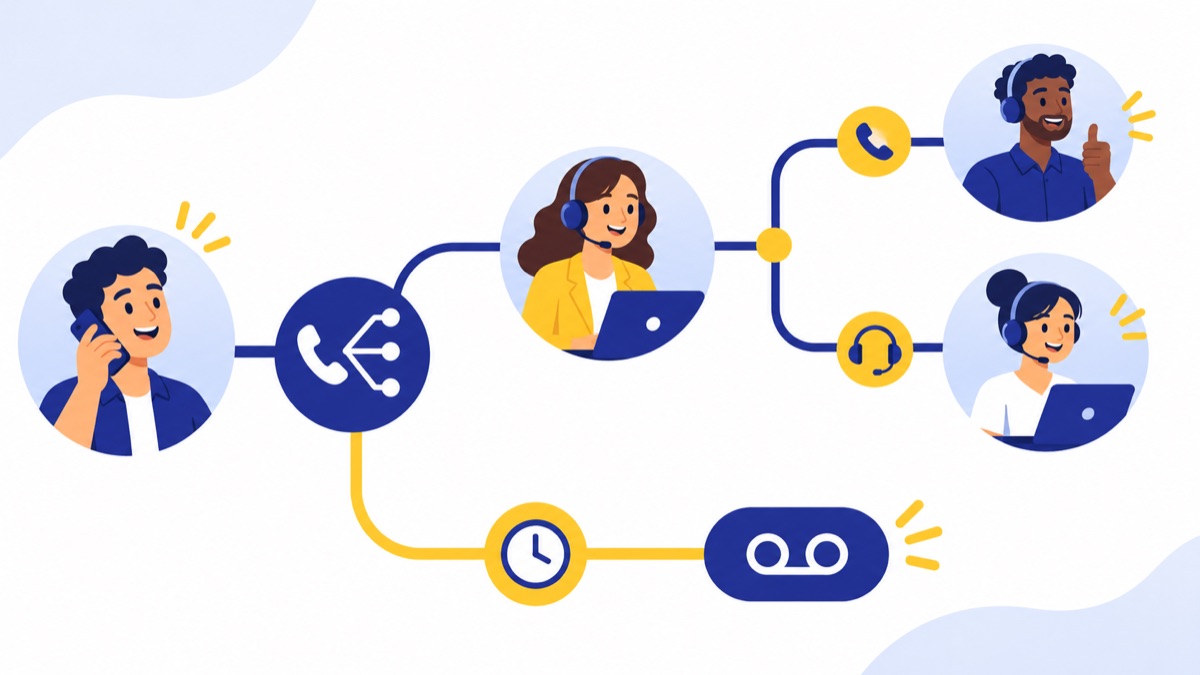
| Situation | Routing action | Team decision |
|---|---|---|
| Business hours | Main number plays a short greeting or menu, then rings the selected team | Decide whether callers can choose sales, support, or a general option |
| First group does not answer | Ring a backup person or move the caller to a queue | Set how long the first group rings before overflow |
| Multiple calls arrive | Queue callers or use a fallback destination | Decide whether a caller waits, leaves voicemail, or requests a callback |
| No agents are available | Offer voicemail or callback capture | Name the person responsible for checking messages and set a response window |
| After hours, weekends, or holidays | Play a schedule-based greeting and route to voicemail or an agreed on-call path | Add emergency instructions only if they apply to the business |
During business hours
Use the fewest menu choices that help callers reach the right group. If everyone handles calls, a shared group may be enough; if sales and support have separate owners, make those paths clear.
When the first group does not answer
Choose a defined ring duration and destination: for example, ring the primary group for a set interval, then send the call to a backup person or queue. The exact timing depends on how quickly your team can answer and how long callers are willing to wait.
Overflow and simultaneous calls
Decide what happens when two or more calls arrive together. If callers should wait for a person, use a queue; if a second call should go to voicemail or another group, configure that fallback and test it with concurrent calls.
Missed calls and voicemail
Use a shared voicemail or notification path the team actively monitors. Assign an owner, a backup owner, and a callback target such as “during the same business day” so callers and staff know what to expect.
After-hours, weekends, and holidays
Set separate schedules for normal hours and holidays, and confirm which time zone the schedule uses. For more options and sample messages, see this three-tier after-hours call-handling plan.
Which call routing rules should you look for?
Useful call routing rules cover business hours, holiday schedules, team availability, fallback destinations, and voicemail ownership. The routing method determines how a call is offered to people, so choose one that matches the team’s workload and the response a caller should receive.
- Simultaneous ring: Calls everyone in a group at once. It is easy to understand and can suit a small team sharing a light call load, but teammates need a plan for who owns follow-up.
- Sequential or cascade: Calls people one after another in a set order. It works when one person is the first responder and another is designated backup, though callers may wait longer as the call moves through the list.
- Round robin: Offers each new call to the next person in rotation. It can spread opportunities across a sales team; check how the system handles agents who are unavailable. See round-robin distribution methods and examples.
- Queue-based distribution: Holds callers until agents can take their calls, then routes them according to the queue’s settings. It helps when several people share inbound demand and the business wants to manage waits, but it requires clear queue messages and overflow behavior.
Ask whether administrators can edit routing rules without provider support. A tool is easier to operate when the person managing schedules can change hours, update destinations, and set holiday exceptions from a browser or mobile app.
Is basic business phone routing enough, or do you need contact-center software?
Basic business phone call routing is often enough when the team needs menus, schedules, ring groups, voicemail, and simple missed-call reporting. Contact-center features become useful when calls must be assigned by skills, measured against response targets, staffed across shifts, or analyzed in greater detail.
Basic routing usually fits when a small team shares responsibility for calls, has straightforward hours, and can follow up on voicemails without complex reporting. If callers can reach the right person and no one needs to manage a large waiting line, a phone system with IVR menus and call routing may cover the practical need.
Consider contact-center capabilities when a business needs:
- Skills-based routing: Assigning calls to agents based on their expertise or other defined criteria.
- Service-level targets: Measuring whether calls are answered within a specified time.
- Workforce management: Planning staffing around expected call demand.
- Advanced analytics: Comparing performance across teams, queues, or time periods.
For additional guidance on matching queue complexity to a small team, see call-center software options for small businesses.
How do you compare providers beyond the feature list?
Compare providers by whether the team can set up and maintain the call flow, work from its usual devices, and follow up reliably. Review number porting, support, emergency-calling procedures, and the full bill as seats and add-ons grow; feature counts alone do not show how a system will behave on a busy day.
Check whether the system includes a browser app and mobile apps that suit remote staff, shared numbers, voicemail, and usable call reports. If the business already depends on a CRM, confirm what the integration records and whether staff can see relevant customer information while handling calls.
Call summaries, texting, a power dialer, and CRM sync can support workflows, but they are optional additions to routing. A sales team might use a dialer for outbound calls; a support team might use texting for follow-up; a CRM sync may help staff log activity. Choose these tools only when they address a real workflow need. The 2025 NFIB Technology Survey found that 9% of surveyed small-business owners reported using AI for customer service, so an AI feature is not a baseline requirement for every team. NFIB 2025 Technology Survey
For pricing, compare the monthly cost at your current seat count and a likely next stage. Include per-user charges, add-ons, phone numbers, usage fees, contract terms, and annual billing so you can estimate the total cost as the team grows. Confirm that your existing number can be moved and ask about any porting steps or expected timing; Voicalyst explains its number-porting process.
U.S. VoIP service depends on broadband and power at your location. FCC rules include location-information requirements for interconnected VoIP 911 calls and require a way for users to update their registered location; the FCC also identifies broadband failure, power loss, and relocation as circumstances that can limit or disrupt E911 service. Ask how the provider handles emergency calling and registered locations, and make sure staff know how to update that information when they move. FCC VoIP E911 rules
What should you test during a call-routing trial?
A call-routing trial should test the paths callers will actually experience: business hours, no available agents, overlapping calls, remote coverage, voicemail, and schedule changes. Use real devices and realistic timing, then confirm that staff know who owns callbacks and how an administrator updates the flow.

Run these scenarios before moving your main number:
- Call during and outside business hours; check the greeting and destination.
- Place two calls at once; confirm the second call follows the intended overflow path.
- Make every agent unavailable; verify callers reach the right voicemail or callback option.
- Test a holiday schedule and a changed shift; check the time zone and effective date.
- Have a remote teammate answer from a mobile or browser app.
- Let a caller abandon a queue; confirm whether the system records the event.
- Leave voicemail; check who gets notified and whether the message is accessible to the right people.
- Ask a nontechnical administrator to make a routine schedule or destination change.
After rollout, review missed-call rate and time to callback. If callers frequently abandon queues or messages wait too long, adjust staffing, overflow, or follow-up ownership before adding more features. For more queue design ideas, use this call queue setup guide by team size.
What is the checklist for choosing call routing software?
Choose the simplest system that handles the company’s real call paths and gives the team a workable way to make changes. Voicalyst offers browser-based business phone tools for sales and support teams; review its virtual phone system and compare the workflow against the checklist below.
- Do callers have a clear path during business hours and after hours?
- Does the routing method fit the call volume and how people share work?
- Is there a tested overflow route when no one answers or several calls arrive?
- Does every voicemail or missed call have an owner and response window?
- Can staff use the browser or mobile apps where they work?
- Can administrators update schedules, holiday hours, and destinations?
- Have you checked integrations and optional tools against actual workflows?
- Have you compared total cost at today’s and expected seat counts?
- Have you confirmed number porting, provider support, and registered-location steps for emergency calling?
When the call flow is clear and the provider passes those tests, talk with Voicalyst about a business phone setup.
Frequently Asked Questions
What is call routing software for a small business?
Call routing software sends incoming business calls to the right person or destination using rules such as business hours, menu choices, team availability, or call order. A small business might ring sales first, send unanswered calls to a shared support group, then offer voicemail or a callback. It often includes schedules, ring groups, and basic reporting.
What is the difference between a ring group and a call queue?
A ring group calls several people at once or in a set order; if nobody answers, the call moves to a fallback destination. A call queue holds callers while agents are busy, then distributes calls as agents become available. Ring groups suit low or occasional shared demand; queues help when wait time and caller abandonment need active management.
Do small businesses need contact-center software?
Many small businesses can handle calls with business-hours rules, menus, ring groups, voicemail, and basic missed-call reporting. Contact-center features become useful when calls need skills-based assignment, service-level targets, workforce management, or deeper analytics across a larger support operation. Choose based on call volume, coverage, and reporting needs rather than employee count alone.