
A power dialer is software that automatically dials the next contact on your list as soon as a rep finishes the previous call. It places one call per available rep, so no one types numbers or waits between calls, and no one gets pulled into a call they weren't ready for. If you're choosing between power and predictive dialing, the short answer is that the power model fits most small and mid-sized teams, and predictive only pays off at high volume with large teams.
This guide covers how a power dialer works, how it compares with predictive, progressive, preview and auto dialers, a decision matrix by team size and lead volume, and the US compliance rules that apply.
What Is a Power Dialer? (Short Answer)
A power dialer is an outbound calling tool that dials contacts from a list one at a time, one call per available rep. When the rep logs the outcome of a call (the disposition), the software places the next call automatically. It removes manual dialing but keeps a human in control of the pace.
Quick summary
- Dialing ratio: one call per available rep
- Rep experience: the rep is on the line before or as the call connects, and often hears rings and voicemail greetings
- Best for: small and mid-sized teams doing conversational outreach
- Not the same as: a predictive dialer, which places several calls per rep and bets that most won't be answered
Power dialer in plain English
Think of it as manual dialing with the dialing removed. The rep still researches, talks and decides what happens next. The software handles the clicking, the queue and the logging.
"Auto dialer" is an umbrella term
People say "auto dialer" for any software that dials automatically. Power, progressive, preview and predictive dialers are all auto dialers in that loose sense. We separate the technical meaning from the legal one further down.
How a Power Dialer Works, Step by Step
List or CRM sync → Dial → Answer detected → Rep connected → Disposition logged → Next call
- Load contacts. Upload a CSV or sync a list or view from your CRM.
- Dial. The system calls the first contact once a rep sets their status to available.
- Detect the outcome. It sees whether the call was answered, went to voicemail or failed.
- Connect the rep. On an answer, the rep is on the line. Depending on the product, the rep may hear the ringing and voicemail greetings too.
- Log a disposition. The rep picks an outcome such as connected, voicemail, wrong number, not interested or callback.
- Dial the next contact. The cycle repeats.
Load a list or sync contacts from HubSpot
Good lists matter more than the dialer. If your team works in HubSpot, a two-way sync means the call, the disposition and the notes land on the contact record without copy-paste. Voicalyst's browser-based power dialer syncs with HubSpot, so reps can work a saved list without installing anything.
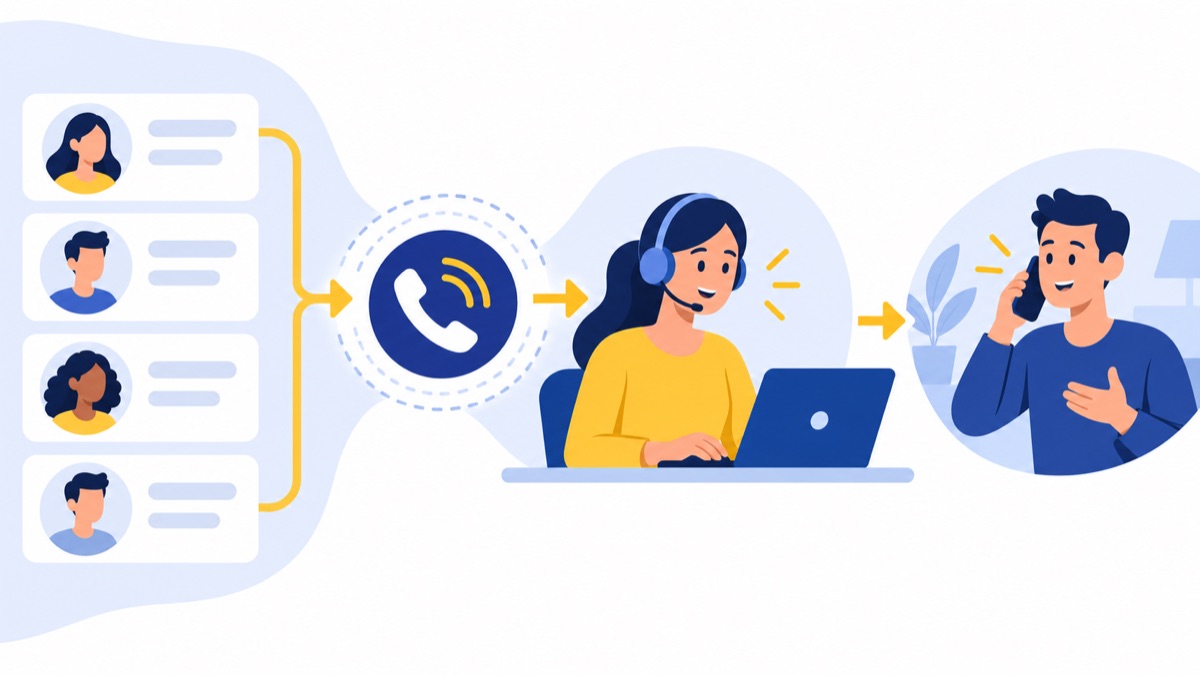
Dial, detect an answer, connect the rep
Answer detection is where products differ. Some connect the rep at the first ring, so they hear every ring and voicemail greeting. Others wait for an answer before connecting, which cuts idle listening but can add a short pause on connect.
Log a disposition and trigger the next call
The disposition is the control point. The tool is only as clean as the outcomes your reps log, so keep the list short (six to eight options) and make each one trigger a clear next step.
Voicemail drop, local presence and AI call summaries
- Voicemail drop: plays a prerecorded message so the rep can move on at once. Prerecorded messages carry their own TCPA considerations, covered below.
- Local presence: shows a number with the contact's area code.
- Call recording: supports coaching and record-keeping, subject to consent laws.
- AI call summaries: write the notes and next steps for you, which matters when a rep makes dozens of calls a day.
A note on speed claims: vendors often cite figures like roughly 80 dials per hour with a power dialer versus about 25 manually (for example, Klenty). That is a vendor claim, not an independent benchmark, and your numbers will depend on list quality and talk time.
Power Dialer vs Predictive vs Progressive vs Preview vs Manual
Definitions vary by vendor, and some treat power and progressive as the same thing. This table shows the common usage.
| Type | Dialing ratio | Abandoned-call risk | Rep idle time | Personalization | Best use |
|---|---|---|---|---|---|
| Manual | Rep dials each call | None | High (dialing, typing) | Highest | Very low volume, high-value accounts |
| Preview | Rep reviews the contact, then triggers the call | None | Medium | Highest | Account-based or complex outreach |
| Progressive | One call per available rep | Very low | Low to medium | High | Conversational sales and callbacks |
| Power | One call per available rep (some vendors allow more) | Low | Low to medium | High | SDRs, small and mid-sized sales teams |
| Predictive | Several calls per rep, set by an algorithm | Highest | Lowest | Low | Large teams, very high volume, short calls |
Power dialer vs predictive dialer
A predictive dialer dials more numbers than you have reps, using an algorithm that estimates how many calls will be answered and when reps will free up. When the guess is right, reps move from call to call with almost no gap. When it's wrong, a person answers and no rep is free, which creates an abandoned call.
The one-call-per-rep model never does that, because it places a call only when a rep is ready. You trade some rep idle time for control, fewer abandoned calls and a rep who can look at the contact before the call connects.
Power dialer vs auto dialer: terminology and legal meaning
In everyday use, "auto dialer" means any software that dials for you. The TCPA uses a narrower term, "automatic telephone dialing system" (ATDS), and in Facebook v. Duguid (2021) the Supreme Court held that it must use a random or sequential number generator. Software that dials a stored list isn't automatically an ATDS under that test, but that doesn't end the compliance question (see the compliance section).
Power dialer vs progressive dialer
Many vendors use the terms interchangeably. Where a distinction exists, a progressive dialer strictly places one call per rep, while a power dialer may allow a small configurable ratio. Ask any vendor how it defines the term and whether you can cap the ratio at one.
Power Dialer vs Predictive Dialer: Which Should You Choose?
The right tool depends on how many reps you have, how many leads you work and how long your calls run. The thresholds below are our judgment, not an industry standard. Treat them as a starting point and test against your own connect rates.
Decision matrix by team size and lead volume
| Team size | Under 500 leads/day | 500–5,000 leads/day | More than 5,000 leads/day |
|---|---|---|---|
| 1–5 reps | Power. Even at this volume, reps run out of time before leads run out. Preview mode is fine for key accounts. | Power. Small teams can't staff a predictive pool, and the algorithm needs enough agents to pace well. | Power, plus better list prioritization. Extra volume is better spent on scoring than on a predictive system. |
| 6–20 reps | Power. Predictive adds compliance risk for little gain. | Power, or test predictive on one team. If calls are short and scripted, run a controlled pilot. | Test predictive. Idle time across the team starts to add up. Run a pilot with abandonment monitoring on. |
| 20+ reps | Power. Volume doesn't justify predictive. | Power or predictive by campaign. Use power for consultative calls and predictive for short outreach. | Predictive for high-volume campaigns. Keep power or preview for named accounts. |
Call type: consultative B2B vs short high-volume outreach
If your calls are consultative, with research before dialing, tailored openers and 5–20 minute conversations, one call per rep fits. If you're making short, scripted calls like survey follow-ups or reminders, where any available rep can take any call, predictive is more defensible.
Connect rate and talk-time considerations
Predictive dialing helps most when the connect rate is low and talk time is short. If only a small share of dials reach a person and calls end quickly, reps spend much of their day waiting, and a higher dialing ratio fills that gap. If your connect rate is healthy or calls run long, a predictive algorithm has less idle time to remove.
Quick rules of thumb and red flags
- Under 20 reps: start with a power dialer.
- Reps need to read context before talking: power or preview.
- Your legal team isn't comfortable with abandoned-call monitoring: don't use predictive.
- Reps are losing time to ringing and voicemail: ask about answer-detection settings before changing dialer type.
- Red flag: a vendor that promises predictive efficiency with no abandonment controls.
Benefits and Drawbacks of Power Dialers
Benefits
- Time saved. No manual dialing or number lookup between calls.
- Consistent pacing. Reps work through a list in order instead of cherry-picking.
- Better CRM data. Dispositions and notes get logged every call, as long as you enforce them.
- Lower compliance exposure than predictive. One call per rep means no abandoned calls from over-dialing.
Most productivity numbers you'll see online come from vendors and don't state their method. Measure your own baseline first.
Drawbacks
- Idle time between calls. Reps still wait through rings, and the gap after each call is longer than with predictive.
- Rings and voicemails reach the rep. Unless answer detection holds the connection, reps hear greetings and dead air.
- Cost. Dialers are typically priced per user per month, and add-ons like local presence, recording or AI features can change the total. Compare plans on the features you'll actually use.
- Garbage in, garbage out. Software speeds up work on a bad list just as fast as on a good one.
US Compliance for Power Dialers (TCPA, TSR, DNC)
This is general information, not legal advice. Rules change and vary by state and by whether you call consumers or businesses, so confirm your process with counsel.

TCPA basics and the Facebook v. Duguid autodialer ruling
The TCPA restricts calls made with an ATDS or an artificial or prerecorded voice. In Facebook v. Duguid, the Supreme Court unanimously held that an autodialer must use a random or sequential number generator. That narrowed the federal definition, so many pages that treat every dialer as an ATDS are out of date.
It doesn't mean anything goes. Some state laws define autodialers more broadly, and consent and Do Not Call rules still apply. Voicemail drops use prerecorded messages, so check how your counsel wants those handled.
Consent: prior express written consent and the vacated one-to-one rule
For marketing calls that require it, "prior express written consent" means a signed written agreement authorizing the calls, as defined in 47 C.F.R. § 64.1200(f)(9). The FCC's "one-to-one" consent rule, which would have required consent tied to a single seller, was vacated by the Eleventh Circuit on January 24, 2025. The earlier standard still applies, so don't build your process around the vacated rule.
FTC abandoned-call rule and the 3% safe harbor
Under the FTC's Telemarketing Sales Rule, a call is abandoned if it isn't connected to a sales rep within two seconds of the person's completed greeting. The safe harbor allows no more than 3% abandoned calls, plus conditions on ring time and recorded messages. The rule is set out in the FTC's rulemaking notice, and you should check the current text of 16 CFR 310.4(b), including how the 3% is measured, before you rely on it.
This matters far more for predictive systems, because they place more calls than there are reps. A dialer that places one call per available rep keeps the risk low, though answer-detection delays can still leave a person waiting, so test it.
Calling hours, Do Not Call lists and B2B vs B2C
- Calling hours: telemarketing calls are generally limited to 8 a.m. to 9 p.m. in the called party's local time (see this state summary and confirm against the FTC's own guidance).
- Do Not Call: scrub lists against the National Do Not Call Registry and your internal DNC list.
- B2B vs B2C: business-to-business calls get some exemptions, but not all, and calls to a cell phone that belongs to a business owner may be treated differently. Don't assume "B2B" means exempt.
State laws and recordkeeping
Several states have their own telemarketing, calling-hour and recording-consent rules. Call recording is a separate issue: some states require every party to consent. Keep records of consent, DNC scrubs and call logs so you can show what happened if a complaint arrives.
Compliance checklist
- Documented consent for any call that requires it
- DNC scrubbing before each upload
- Time-zone controls set to 8 a.m.–9 p.m. local time or tighter
- Recording disclosure or consent for all-party states
- Abandoned-call monitoring if you use any ratio above one
- Counsel review of voicemail drop messages
- Consent and call records retained
Who Should Use a Power Dialer
SDRs and outbound sales teams
SDRs work through lists in blocks, so this setup fits naturally. A typical rhythm is a 60–90 minute call block with notifications off and dispositions logged live, followed by follow-up emails.
Small business and founder-led sales
When the founder is also the sales team, time is the constraint. A browser-based tool with CRM sync avoids a heavy setup and keeps follow-ups from getting lost.
Support and customer success callbacks
Support teams can use one for callback queues, such as returning missed calls or checking in after a ticket closes. The one-call-per-rep pace suits conversations that need account context.
Appointment setting and follow-up
Clinics, home services and agencies use dialers to confirm appointments and chase quote follow-ups. Mind consent here: transactional calls and marketing calls can be treated differently, so ask counsel which applies.
How to Choose a Power Dialer: Checklist
Must-have features
- Disposition logging with custom outcomes
- Voicemail drop
- Local presence
- Call recording with consent controls
- Queue and list management
- AI call summaries (useful, but not a deal-breaker)
CRM integration (HubSpot)
If you use HubSpot, check that contacts, lists and activity sync both ways, calls are logged automatically, and dispositions map to properties you report on. Test it with your own data during the trial, not the demo data.
Compliance tools: DNC scrubbing, time-zone controls, call recording consent
Ask whether DNC scrubbing is built in or a separate step, and whether time-zone windows are enforced by contact or only by account. Confirm that you can cap the dialing ratio at one.
Pricing and scalability
Most vendors charge per seat per month, with possible add-ons for minutes, numbers and recording storage. Get a quote for your actual team size, and ask what changes at 5, 10 and 25 seats.
Questions to ask vendors
- How do you define "power dialer," and can I cap it at one line per rep?
- When does the rep hear the call: at ring or on answer?
- How do you handle DNC scrubbing and time zones?
- What does the HubSpot sync write back, and how often?
- What's the total monthly cost at my team size, with all add-ons?
- Can I export my call data if I leave?
For small teams that want a browser-based dialer with HubSpot sync and AI call summaries, Voicalyst is built for that use case. Try it on a real list and compare the results with your current baseline.
Tips to Get More From Your Power Dialer
- Clean your lists. Remove duplicates, wrong numbers and DNC entries before uploading. This improves connect rate more than any setting.
- Prepare scripts and voicemail templates. Write a 15-second opener and a 20-second voicemail, then test two versions.
- Run call blocks. Work 60–90 minutes at a time, then do follow-up tasks. Context-switching kills the pace the software creates.
- Track the right metrics. Watch connect rate, talk time and conversations per hour, not just total dials. Record a baseline before you switch so you can compare.
Frequently Asked Questions
Is a power dialer legal?
Yes, using one is legal in the US, but the calls it places must still follow the rules. That means consent where required, Do Not Call compliance, calling hours of 8 a.m. to 9 p.m. in the called party's local time, and state laws. A power dialer doesn't exempt you from any of them. Confirm your setup with counsel.
What's the difference between a power dialer and an auto dialer?
"Auto dialer" is an umbrella term for any software that dials numbers automatically, including power, progressive, preview and predictive dialers. A power dialer is one specific type: it places one call per available rep. Legally, "autodialer" has a narrower TCPA meaning, which turns on random or sequential number generation.
How many calls per hour can I make with a power dialer?
It depends on your list quality, connect rate and how long reps spend on conversations and notes. Vendors publish figures such as about 80 dials per hour versus about 25 manually, but those are self-reported, not independent benchmarks. Measure your own baseline for a week, then compare it after switching.
Is a power dialer the same as a progressive dialer?
Often, yes. Many vendors use the terms interchangeably: both place one call per available rep and wait for the rep to finish before dialing again. Some vendors draw a distinction, for example by letting a power dialer place more than one line per rep. Ask any vendor how it defines the term.
Does a power dialer work with HubSpot?
Many do, but depth varies. Look for contact and list sync, calls logged automatically to the contact record, dispositions mapped to HubSpot properties, and call notes or summaries attached to the activity. Voicalyst's power dialer syncs with HubSpot. Test the integration with your own lists and properties during a trial.