
A useful IVR helps callers reach the right person or finish a simple task without wading through a maze of options. These IVR best practices show how to spot common menu mistakes, rewrite them with before-and-after examples, and measure whether the new call flow actually works for a small US sales or support team.
Key takeaways
- An IVR menu should start with callers’ most common reasons for calling, not the company’s org chart.
- Three or four choices can be a practical starting point for a main menu, but caller behavior—not a universal rule—should determine the final design.
- Every menu needs a clear route to a person or general queue, plus defined paths for silence, invalid input, and failed self-service.
- Separate business-hours, after-hours, holiday, and outage flows so callers hear accurate options for the moment they call.
- Abandonment, invalid inputs, transfers, queue wait, and resolution outcomes help identify where a menu needs revision.
What should a useful IVR do?
A useful IVR gets callers to the right outcome with as little confusion as possible. It should support self-service when that genuinely solves a common request, route other callers to a staffed person or team, and explain what happens when the usual route is unavailable.
IVR vs. auto attendant: what does the caller experience?
An IVR, or interactive voice response system, accepts caller input—such as keypad selections or speech—and can use that input to route a call or complete simple tasks. An auto attendant greets callers and directs them to a person, team, or voicemail. In business phone systems, the terms often overlap: callers hear a menu, choose an option, and get routed.
Call routing is the rule that sends a call to a destination, such as a sales queue, support team, voicemail box, or another number. For a small business, a simple keypad menu can be enough; automated self-service is useful only when it reliably saves callers a step.
Phone routing matters because customers still rely on it: Gartner reported in March 2025 that 36% of customers said the phone was their primary channel for service interactions (Gartner). That is a reason to treat the menu as part of the service experience, not just a switchboard.
How should you choose IVR menu options?
Choose menu options based on why callers contact the business and where the team can help them. Call patterns, agent feedback, and resolution outcomes reveal which requests deserve a direct option and which can share a general route.
Start by reviewing a few weeks of call dispositions, notes, or recordings if available. Ask the people who answer calls which requests recur, what callers say when they reach the wrong person, and which issues can be handled by the same employee.
Then translate those intents into caller-friendly choices:
| Internal label | Caller-friendly option |
|---|---|
| Business development | “For a new quote or to discuss a purchase…” |
| Customer success | “For help with an existing order or account…” |
| Accounts receivable | “For a billing question…” |
| Main line | “For anything else or to reach our team…” |
If the same two people handle sales and account questions, avoid offering separate options that both land in the same queue without a useful distinction. Group requests when the caller gets to the same capable, staffed team either way. Keep rare needs in the general route.
Mistake 1: The IVR menu is too long
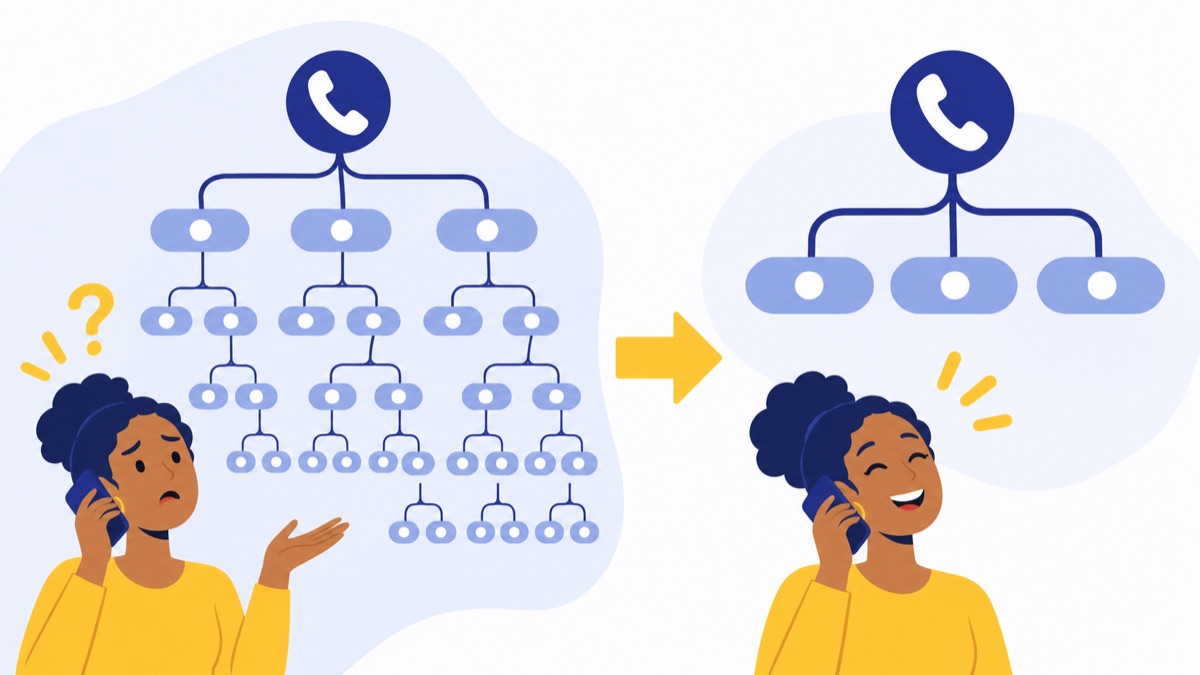
A long IVR menu makes callers hold several choices in memory before they can act. Put the most common reasons first and move infrequent requests into a short submenu or general route; three or four main choices are a sensible starting point to test, not a universal limit.

Before and after: trim a crowded main menu
Before:
“For sales, press 1. For existing accounts, press 2. For billing, press 3. For technical support, press 4. For returns, press 5. For partnerships, press 6. For our address, press 7. For all other questions, press 8…”
This menu gives every request equal weight, even though a small team may route billing, returns, and account questions to the same person.
After:
“For a new quote, press 1. For help with an order or account, press 2. For anything else or to reach our team, press 3.”
The improved version groups work by caller intent and puts a useful general route on the main menu. If data shows that billing deserves its own staffed destination, add it. If the extra choice increases invalid inputs or abandonment, consolidate it again.
A practical way to assess an IVR menu too long problem is to compare abandonment and invalid-key rates at each node before and after shortening the prompt. Review a full call flow and sample scripts in the IVR phone menu setup guide.
Mistake 2: Options use company jargon
Company jargon forces callers to guess how the business is organized before they can ask for help. Use words callers are likely to use, and say the goal before the key—for example, “For a new quote, press 1”—so people can connect their need to an action.
Before and after: rewrite abstract labels
Before:
“For Client Solutions, press 1. For Revenue Operations, press 2. For Customer Experience, press 3.”
After:
“For a new quote, press 1. For help with an existing order, press 2. For billing, press 3.”
These are practical IVR design tips because they remove translation work for the caller. Keep the spoken labels short, and avoid internal product names, acronyms, or terms that only employees use.
Mistake 3: The human route is hidden
Every IVR should give callers a clear way to reach a person or general queue, even when self-service options are available. Tell callers which option reaches that route, and make the same path accessible after an unsuccessful self-service step when the system supports it.
The specific keypad convention depends on the phone setup, so state the configured choice instead of assuming callers know it. A caller who does not recognize any option should not have to guess repeatedly.
Before:
“Press 1 to check order status. Press 2 to update payment details.”
After:
“Press 1 to check an order. Press 2 for billing help. To reach our team, press 0.”
Only use a stated key if it is configured to do what the prompt promises. If the team is closed or the queue is full, explain the next step rather than leaving the caller in a silent wait.
Mistake 4: Callers hit loops, dead ends, or silence failures
A menu needs a defined next step for silence, invalid keys, and self-service that does not resolve the caller’s issue. Set a limited retry path, then send the caller to a suitable general queue or monitored voicemail instead of replaying the same menu indefinitely.
Before: A caller enters an unsupported key, hears the menu again without explanation, and gets sent back to the same prompt after two more errors.
After: “Sorry, we didn’t recognize that selection. Please choose one of these options.” After a set number of attempts, route the caller to a general queue or voicemail that someone checks.
For silence, allow a brief pause, repeat the choices once, then provide a clear fallback. For failed self-service, make the next step linear: “If you still need help, press 0 to reach our team.” This kind of fallback is one of the most useful auto attendant best practices because callers can recover without starting over.
Mistake 5: One menu tries to serve every situation
A business should use separate call paths for open hours, after hours, holidays, and outages because staffing and available help change. State the next opening time when closed and offer a voicemail or callback option only if someone will monitor it.
What should an after-hours phone menu include?
An after-hours message should say that the business is closed, give the next opening time, and tell callers what they can do next. Keep voicemail destinations monitored and make any callback promise match the team’s actual process.
Business hours:
“Thanks for calling Northline Supply. For a new quote, press 1. For help with an order, press 2. For anything else, press 3.”
After hours:
“Thanks for calling Northline Supply. We’re closed and reopen Monday at 8 a.m. Central. Leave a message for a callback during business hours, or press 1 to hear our address and opening hours.”
Before holidays or staffing changes, update the schedule and test the closed-hours path. During an outage, replace options that cannot work with an honest explanation and an alternate monitored destination.
Mistake 6: Routing loses context or ignores the queue
Route calls to a team that is staffed and able to handle the request, and pass along the caller’s menu choice when possible. If callers wait, tell them what to expect and offer a real overflow route, voicemail, or callback option when available.
A call to a sales queue should not land with someone who can only take a message, and a caller who chose billing should not need to explain the choice again if the receiving employee can see it. A CRM note, call disposition, or queue label can preserve useful context, but never promise data that the phone setup does not actually pass along.
Review the queue’s staffing, overflow, and callback rules with the call queue setup guide. If your phone system connects menus to queues, voicemail, and business numbers, Voicalyst’s IVR and call routing features describe that setup.
Mistake 7: The menu goes live without testing or review
Test the entire call flow from a caller’s perspective before launch and after every meaningful change. A single successful test of the greeting is not enough; each menu branch, fallback, schedule, and destination needs to work.
Use a short test checklist:
- Call during business hours and after hours.
- Try every keypad option, an invalid key, and no input.
- Test a failed self-service path and every live-help route.
- Confirm queue overflow, voicemail, callback, and holiday behavior.
- Call from a mobile phone, then listen in a noisy environment.
- Check that speech is easy to understand and recording quality is clear.
- Ask a colleague unfamiliar with the menu to complete common tasks without coaching.
Track abandonment by menu node, invalid inputs, transfers, repeated navigation, queue wait, callback uptake, and resolution outcomes. Rising abandonment at one prompt may point to a long or unclear menu; repeated transfers can signal that the options send callers to the wrong team. Agent feedback and appropriately reviewed call recordings can help explain the numbers.
Measure end-to-end outcomes as well as menu completion. Qualtrics XM Institute’s 2024 Global Consumer Study included more than 23,000 consumers and found that fewer than two-thirds of issues were resolved on the first contact (Qualtrics XM Institute). The finding is not an IVR score; it supports checking whether callers got their issue resolved, not just whether they made it through the menu.
Review the menu at a regular interval and whenever hours, staffing, campaigns, or phone destinations change. Small updates prevent an accurate menu from turning into a misleading one.
What is a practical IVR flow for a small team?
A small team can route callers by intent using a short main menu, one clear general route, and a simple closed-hours path. The example below assumes the same employee can help with some sales and account requests; adjust the options to match your actual staff and call patterns.
Sample business-hours flow
Greeting
├── 1: New quote → Sales queue
├── 2: Order or account help → Support queue
└── 3: Other question or live help → General queue
    ├── Queue answered → Employee sees selected menu option, if supported
    └── Queue unavailable → Monitored voicemail or callback option
Script:
“Thanks for calling Northline Supply. For a new quote, press 1. For help with an order or account, press 2. For anything else or to reach our team, press 3.”
Sample after-hours flow
Closed-hours greeting
├── 1: Leave a message for a callback during business hours
└── 2: Hear opening hours and address
Script:
“Thanks for calling Northline Supply. We’re closed and reopen Monday at 8 a.m. Central. Press 1 to leave a message for a callback during business hours, or press 2 to hear our hours and address.”
Confirm that the schedule and message destination are correct before using the script. For more voicemail wording, adapt a suitable option from these business voicemail greeting scripts.
IVR best-practices checklist
A strong IVR menu uses caller-centered wording, routes to staffed destinations, and gives people a way to recover when a choice does not work. Use this checklist before launch and during routine reviews.
- Put the most common caller goals first.
- Keep prompts brief and use plain language; say the goal before the keypad number.
- Offer a clear route to a person or general queue.
- Set retry limits and fallback paths for silence, invalid input, and failed self-service.
- Provide separate, accurate business-hours, after-hours, holiday, and outage messages.
- Route to staffed queues and preserve the caller’s selected intent when supported.
- Check pacing, recording clarity, language access, and accessibility for your callers.
- Test every branch on a mobile phone and in a noisy setting.
- Review abandonment, invalid inputs, transfers, queue outcomes, and resolution data.
- Update the menu when hours, staffing, campaigns, or destinations change.
For a small business, a cloud phone system can connect the menu to queues, voicemail, business numbers, and CRM context. Voicalyst offers IVR and call routing tools for teams reviewing that setup; choose a call flow that fits your staffing and the reasons your customers call.
Frequently Asked Questions
How many options should an IVR menu have?
Start with three or four clear choices on the main menu, then test whether callers can follow them without repeating the prompt. That number is a practical starting point, not a universal rule. If callers abandon or enter invalid keys at one menu node, simplify that node or move less common requests to a submenu or general queue.
How do you make an IVR menu less frustrating?
Put the most common caller goals first, use plain language, keep prompts brief, and make live help or a general route easy to find. Tell callers what happens after each choice. Add clear paths for silence, invalid input, closed hours, and failed self-service, then review menu-level abandonment and transfer data to find friction.
What should an IVR greeting say?
Identify the business, give a short welcome, and move directly to the most useful options. State the caller’s goal before the keypad number, such as “For a new quote, press 1.” Avoid long preambles, internal department names, and information callers cannot act on. Include accurate hours or closure details when they affect routing.
How do you get to a live person through an IVR?
The menu should tell callers how to reach a person or a general queue, using the keypad option configured for that business. The right key varies by system, so do not assume one convention. If staff are unavailable, explain the next step and offer a suitable callback, voicemail, or other monitored route.
What is the difference between an IVR and an auto attendant?
An auto attendant greets callers and directs them to people, teams, or voicemail. IVR, or interactive voice response, is the broader system that takes caller input—such as keypad selections or speech—and can route calls or handle simple self-service tasks. In everyday business phone systems, the terms often overlap.
How do you measure IVR performance?
Track abandonment by menu node, invalid inputs, transfers, repeated navigation, queue wait, callback uptake, and resolution outcomes. Each measure points to a different issue: repeated transfers may signal poor routing, while invalid inputs may indicate confusing prompts. Pair call data with agent feedback or reviewed recordings, and assess whether callers’ issues were resolved.
What should an after-hours phone menu include?
An after-hours menu should state that the business is closed, give the next opening time, and offer a useful monitored voicemail or callback path. Include emergency instructions only when they are accurate and appropriate. Check holiday schedules and staffing changes before they take effect, and make sure callers are not sent to an unstaffed queue.